
User Guide for FESCO Bill Online
The user guide for checking, downloading, or printing your FESCO bill online from the fescoonlinebills.com.pk website is as follows:
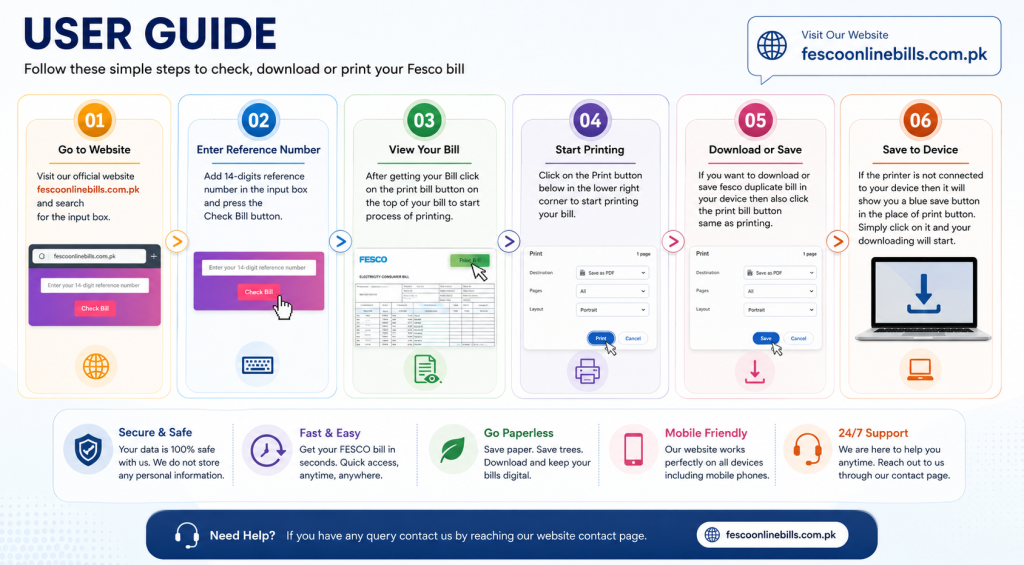
Checking your FESCO electricity bill online has never been easier. With fescoonlinebills.com.pk, you can instantly access your latest FESCO bill, download a duplicate copy, and print it whenever needed. Whether you have lost your original bill, want to verify the payable amount, or need a PDF copy for your records, our platform offers a fast, secure, and hassle-free solution. There is no need to register or create an account—simply enter your 14-digit Reference Number or 10-digit Customer ID to view your bill within seconds.
Step 1: Open the Website
Visit fescoonlinebills.com.pk using any web browser on your mobile phone, tablet, laptop, or desktop computer. The website is optimized for all devices, ensuring a smooth and responsive experience.
Step 2: Enter Your Bill Details
Locate the bill checking form on the homepage. Enter your 14-digit Reference Number or 10-digit Customer ID exactly as it appears on your previous FESCO bill. Make sure there are no spaces or typing errors.
Step 3: Click the “Check Bill” Button
After entering your bill details, click the Check Bill button. Within a few seconds, your latest FESCO bill will appear on the screen with complete billing information, including the billing month, due date, total payable amount, and other important details.
Step 4: Review Your Bill
Carefully verify all bill information before making your payment. Check the customer name, billing period, meter reading, electricity units consumed, taxes, surcharges, and the final payable amount.
Step 5: Print Your Duplicate Bill
If you need a printed copy, click the Print Bill button. Your browser’s print window will open automatically. Select your printer and click Print to get a physical copy of your duplicate FESCO bill.
Step 6: Download the Bill as a PDF
If a printer is unavailable, choose the Save as PDF option from the print dialog. Your duplicate FESCO bill will be downloaded to your device, allowing you to print or share it later whenever required.
Tips for a Better Experience
- Always enter the correct Reference Number or Customer ID.
- Use an updated web browser for the best performance.
- Keep a PDF copy of your bill for future reference.
- Verify the due date to avoid late payment surcharges.
- Refresh the page and try again if your bill does not load immediately.
Why Use FESCO Online Bills?
fescoonlinebills.com.pk provides a simple, secure, and reliable way to check your FESCO bill online. The website is available 24/7, works on all devices, requires no registration, and enables you to view, print, or download your duplicate electricity bill in just a few clicks. Whether you are at home, in the office, or traveling, you can access your latest FESCO bill anytime and anywhere.